Summary: in this tutorial, you will learn how to use MySQL CASE statements to construct complex conditionals.
Besides the
IF statement, MySQL also provides an alternative conditional statement called MySQL CASE. The MySQL CASE statement makes the code more readable and efficient.
There are two forms of the CASE statements: simple and searched CASE statements.
Simple CASE statement
Let’s take a look at the syntax of the simple CASE statement:
|
|
CASE case_expression
WHEN when_expression_1 THEN commands
WHEN when_expression_2 THEN commands
...
ELSE commands
END CASE;
|
You use the simple CASE statement to check the value of an expression against a set of unique values.
The case_expression can be any valid expression. We compare the value of the case_expressionwith when_expression in each WHEN clause e.g., when_expression_1, when_expression_2, etc. If the value of the case_expression and when_expression_n are equal, the commands in the corresponding WHEN branch executes.
In case none of the when_expression in the WHEN clause matches the value of thecase_expression, the commands in the ELSE clause will execute. The ELSE clause is optional. If you omit the ELSE clause and no match found, MySQL will raise an error.
The following example illustrates how to use the simple CASE statement:
1
2
3
4
5
6
7
8
9
10
11
12
13
14
15
16
17
18
19
20
21
22
|
DELIMITER $$
CREATE PROCEDURE GetCustomerShipping(
in p_customerNumber int(11),
out p_shiping varchar(50))
BEGIN
DECLARE customerCountry varchar(50);
SELECT country INTO customerCountry
FROM customers
WHERE customerNumber = p_customerNumber;
CASE customerCountry
WHEN 'USA' THEN
SET p_shiping = '2-day Shipping';
WHEN 'Canada' THEN
SET p_shiping = '3-day Shipping';
ELSE
SET p_shiping = '5-day Shipping';
END CASE;
END$$
|
How the stored procedure works.
- The
GetCustomerShipping stored procedure accepts customer number as an IN parameter and returns shipping period based on the country of the customer.
- Inside the stored procedure, first we get the country of the customer based on the input customer number. Then we use the simple
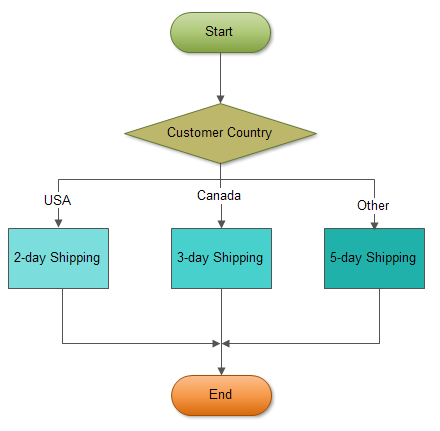
CASE statement to compare the country of the customer to determine the shipping period. If the customer locates in USA, the shipping period is 2-day shipping. If the customer is in Canada, the shipping period is 3-day shipping. The customers from other countries have 5-day shipping.
The following flowchart demonstrates the logic of determining shipping period.
The following is the test script for the stored procedure above:
|
|
SET @customerNo = 112;
SELECT country into @country
FROM customers
WHERE customernumber = @customerNo;
CALL GetCustomerShipping(@customerNo,@shipping);
SELECT @customerNo AS Customer,
@country AS Country,
@shipping AS Shipping;
|
Searched CASE statement
The simple CASE statement only allows you match a value of an expression against a set of distinct values. In order to perform more complex matches such as ranges you use the searched CASEstatement. The searched CASE statement is equivalent to the IF statement, however its construct is much more readable.
The following illustrates the syntax of the searched CASE statement:
|
|
CASE
WHEN condition_1 THEN commands
WHEN condition_2 THEN commands
...
ELSE commands
END CASE;
|
MySQL evaluates each condition in the WHEN clause until it finds a condition whose value is TRUE, then corresponding commands in the THEN clause will execute.
If no condition is TRUE , the command in the ELSE clause will execute. If you don’t specify the ELSEclause and no condition is TRUE, MySQL will issue an error message.
MySQL does not allow you to have empty commands in the THEN or ELSE clause. If you don’t want to handle the logic in the ELSE clause while preventing MySQL raise an error, you can put an emptyBEGIN END block in the ELSE clause.
The following example demonstrates using searched CASE statement to find customer level SILVER,GOLD or PLATINUM based on customer’s credit limit.
1
2
3
4
5
6
7
8
9
10
11
12
13
14
15
16
17
18
19
20
21
22
|
DELIMITER $$
CREATE PROCEDURE GetCustomerLevel(
in p_customerNumber int(11),
out p_customerLevel varchar(10))
BEGIN
DECLARE creditlim double;
SELECT creditlimit INTO creditlim
FROM customers
WHERE customerNumber = p_customerNumber;
CASE
WHEN creditlim > 50000 THEN
SET p_customerLevel = 'PLATINUM';
WHEN (creditlim <= 50000 AND creditlim >= 10000) THEN
SET p_customerLevel = 'GOLD';
WHEN creditlim < 10000 THEN
SET p_customerLevel = 'SILVER';
END CASE;
END$$
|
If the credit limit is
- greater than 50K, then the customer is
PLATINUM customer
- less than 50K and greater than 10K, then the customer is
GOLD customer
- less than 10K, then the customer is
SILVER customer.
We can test our stored procedure by executing the following test script:
|
|
CALL GetCustomerLevel(112,@level);
SELECT @level AS 'Customer Level';
|
In this tutorial, we’ve shown you how to use two forms of the MySQL CASE statements including simpleCASE statement and searched CASE statement.
.png)